CTHINGS.CO Edge IoT Gateway XS 2032
Description
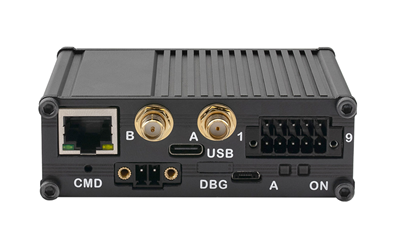
CTHINGS.CO Edge IoT Gateway XS 2032 is a gateway for the Meshtech BLE network. It contains the CTHINGS.CO nRF52840 connectivity card.
Configuration and monitoring of the gateway is available through Meshtech Device Management Portal.
- Firmware Model Number: 0x2032
- Downlinks: Up to 18
Normal Operation Procedure
Power up the gateway (PoE or 12-24VDC). Device need to get IP/network settings by DHCP on the ethernet port. If properly configured and able to reach the internet (MQTT with TLS port 8883, and DNS query) it will provision itself towards iot.meshtech.no. There you can log in, claim, activate and configure it. If it is the first time powering up gateway, wait for LED A to blink Green before claiming it. BLE MAC address will be used as gateway's ID. Use gateway ID or CTHINGS.CO serial number (SN) for claiming.
LED Indication
There are two LEDs on the device. One system LED ON blink blue to indicate system is running, amber when shutdown. The other LED A is configured like this:
| Name | Pattern | Description | Notes |
|---|---|---|---|
| A | Blink red two times at the end of every second | Device is installing upgrade. Avoid cutting power while it is blinking if possible. | |
| A | No green LED | Gateway host is not in contact with BLE interface, not ready or not running. | |
| A | Blink green two times at the end of every second | Gateway is running and in contact with BLE interface but no management connection established. | |
| A | Constant green light | Gateway is running and connected to device management. | Changed in version 9.2.0 to show management connection status instead of BLE activated state. |
Note
After system upgrade LED A will be off while BLE interface is upgrading. This is normal and can take up to a few minutes.
Properties
Note
Scan Window range is 5 - 95 %. It is highly recommended to not increase scan-window above 24 % (default). Increases beyond 24 % will negatively affect throughput from extenders or devices connected (connected mode, or temporarily connected).
Note
After performing factory-reset (by writing 0x8301 - Factory Reset command property) it is necessary to "Clear token" in Device Management before gateway can provision itself. You will also need to activate and send required configuration (typically backend.json) to use it again.
Removed
| Property | Reported | Default Value | Added in version | Removed in Version |
|---|---|---|---|---|
| 0x8861 - Salto Endpoint (BETA) | No | "" | 8.0.0 | 9.2.0 |
Measurements
| Measurement |
|---|
| 0x8410 - Upstream Packets Sent |
| 0x8411 - Upstream Packets Lost |
| 0x8412 - Downstream Packets Sent |
| 0x8413 - Downstream Packets Lost |
Variants
| Product Name | Variant | Description |
|---|---|---|
| CTHINGS.CO Edge IoT Gateway XS 2032 | 0x00 | Ethernet |
Root Certificates Management
Additional root certificates (in PEM format) can be added using 0x8030 - Add Root Certificate or
removed using 0x8031 - Remove Root Certificate.
The current set of additional root certificates can be read using 0x8032 - Root Certificates and
0x8033 - Root Certificate Fingerprints.
Root Certificates are needed for accessing HTTPS endpoints that present a certificate not signed by an official trusted certificate authority (CA).
Release Notes
Licenses
| Component | License(s) |
|---|---|
| MQTTnet | MIT |
| Newtonsoft.Json | MIT |
| System.IdentityModel.Tokens.Jwt | MIT |
| System.IO.Ports | MIT |
| protobuf-net | Apache-2.0 |
| .NET | MIT, Apache-2.0 |
| poky | MIT, GPLv2 |
| meta-openembedded | MIT |
| arping | GPLv2 |